Mobile Bests
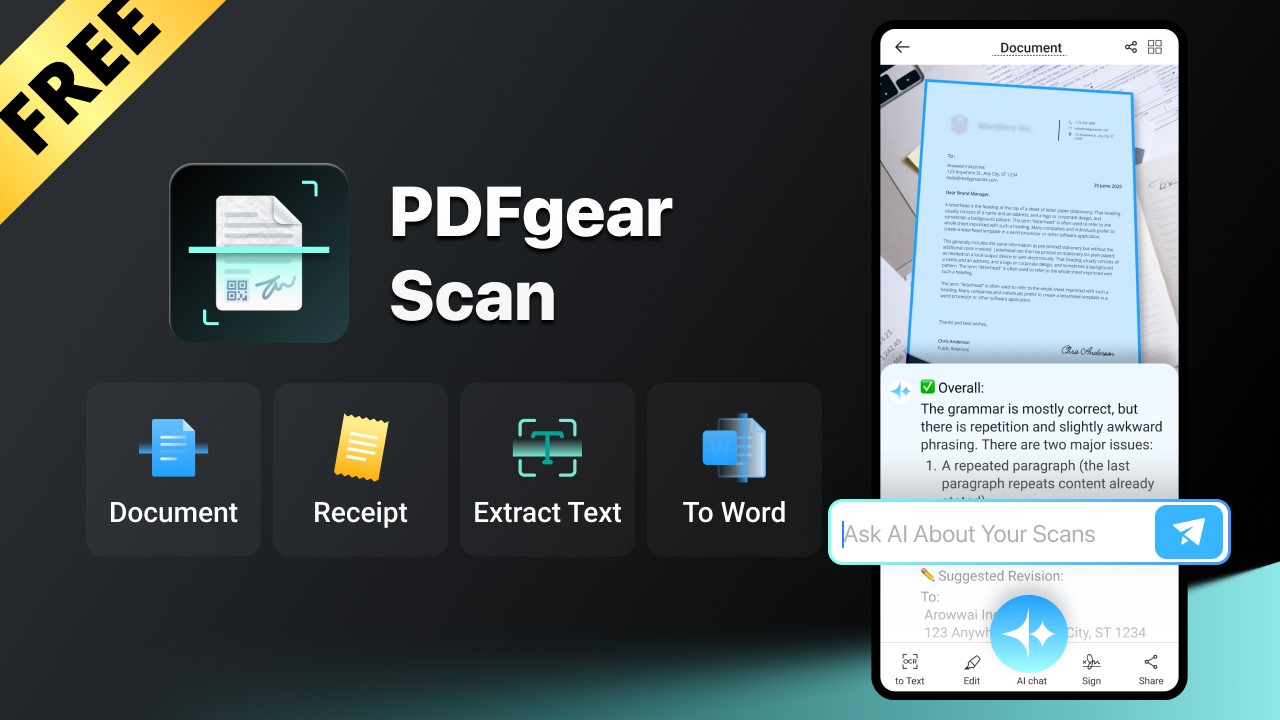
PDFgear Scan is a comprehensive scanning application powered by artificial intelligence, and it comes at no cost to users.
Unlock the Power of Scanning Without Breaking the Bank: Discover PDFgear Scan for Cost-Free Efficiency!
Unleashing the Power of Your Documents: Meet PDFgear Scan!
In the whirlwind of daily life, paperwork can often feel like a never-ending chore. From bank statements and essential contracts to tax notices, bills, and various forms, the task of keeping all these documents organized can seem overwhelming. This challenge escalates when you factor in both physical and digital files. Fortunately, there’s a solution that can transform the way you handle your paperwork: the PDFgear Scan app. Not only is it incredibly versatile, but it also comes at no cost to you! Here's everything you need to know about this remarkable tool.
PDFgear Scan: Your Ultimate Scanning Companion
Before diving into its advanced capabilities, let’s spotlight PDFgear Scan’s primary function—its scanning prowess. The griping issues of document management begin here, and PDFgear Scan excels in delivering high-quality scans that meet a myriad of needs.
This app is equipped to automatically detect document edges, meticulously cropping images for precise, high-quality scans. Its specialized scanning modes cater to various documents, including receipts, invoices, and IDs, ensuring that key details—like invoice totals or ID numbers—are captured flawlessly.
Whether you snap a picture of a document in real time or utilize images stored in your gallery, PDFgear Scan intelligently removes cluttered backgrounds. It expertly deskews and straightens the document, mimicking the results of a bulky traditional scanner without the hassle. You can elevate your scanned documents with multiple filters to enhance clarity, applying different styles to individual pages as necessary.
But that’s just the beginning. PDFgear Scan simplifies multi-page scanning, allowing users to effortlessly merge several scans into one comprehensive PDF. You have the flexibility to add, rotate, delete, and rearrange pages with just a few taps—making document management smoother than ever.
Editing Made Easy: Features Beyond Scanning
What sets PDFgear Scan apart is its built-in editing functionalities, a rarity among scanning applications often locked behind costly subscriptions. The app employs Optical Character Recognition (OCR) technology to convert scanned documents into editable text, enabling you to make modifications as needed. Users can even extract specific text from their documents to export as PDFs or Word files.
For those needing signatures on various forms, PDFgear Scan allows you to add them digitally, simplifying tasks such as submitting applications. Need to include images in your notes? The app has you covered, allowing for seamless integration without fussing over separate applications.
Once you've crafted the perfect scanned document, you can easily save it to your device, share it with others, or even back it up by sending it to yourself. You aren’t confined to just PDF formats; sharing your scans as Word documents or image files is straightforward as well!
Harness the Power of AI for Enhanced Functionality
The capabilities of PDFgear Scan extend even further, thanks to its innovative AI features. While it already outperforms many other scanning apps, these recent enhancements elevate it to a new level. For starters, the app can automatically classify receipts into expense reports, easing the burden of budgeting and reimbursement tasks.
Students, take note! If you’re scanning your study notes, PDFgear Scan’s embedded AI can analyze the content and provide answers to questions found within your documents. For those tricky math problems, the app doesn’t just stop at answers—it provides detailed, step-by-step solutions. Additionally, it can generate AI-assisted summaries of extensive documents, streamlining your study sessions and helping you pinpoint key information swiftly.
A Reliable, Cost-Free Solution for Document Management
Accessible on both iOS and Android platforms, PDFgear Scan is much more than just a scanning application. It is a dynamic tool that allows users to manage, edit, and modify documents effortlessly. It boasts a range of features, from filters and highlights to automatic receipt classification—all without spending a dime.
If you’re hesitant about potential costs, rest assured: PDFgear Scan remains completely free at this moment. While the company might introduce premium pricing in the future, maintaining accessibility is a core principle for them right now.
In search of a superior document scanning application brimming with features to streamline your document management experience? Look no further than PDFgear Scan—it truly sets the standard!